Building a job board website connects employers with job seekers, offering tools for job postings, applications, and filtering opportunities. Here's how you can create one:
- Choose a Niche: Focus on a specific industry, role type, or community to stand out. Validate demand by researching trends and speaking to employers and job seekers.
- Revenue Models: Start with pay-per-job posting ($99–$299 per post). Add options like subscriptions, featured listings, or advertising as your platform grows.
- Select a Platform: No-code job board software like Job Boardly simplifies setup with features like Stripe payments, SEO tools, and job aggregation. If you'd rather start from a pre-built design, compare the leading job board templates.
- Key Features: Include filters (job type, location, salary), mobile responsiveness, and dashboards for employers and job seekers.
- Launch Steps: Secure a domain, integrate Stripe for payments, and customize branding. Use job aggregation to populate listings early on.
- Drive Traffic: Use SEO, targeted content, email lists, and partnerships to attract users. Promote through social media and ads.
- Monetize: Offer tiered pricing for job posts, bulk packages, and premium options like featured placements.
Focus on simplicity and core features at launch, then refine based on feedback. A clear niche and consistent updates will help your job board thrive.
New to the concept? Our explainer on 👉 what a job board is covers the fundamentals - why they make great businesses and how they work - before you dive into the steps below.
Planning Your Job Board: Niche, Audience, and Revenue Model
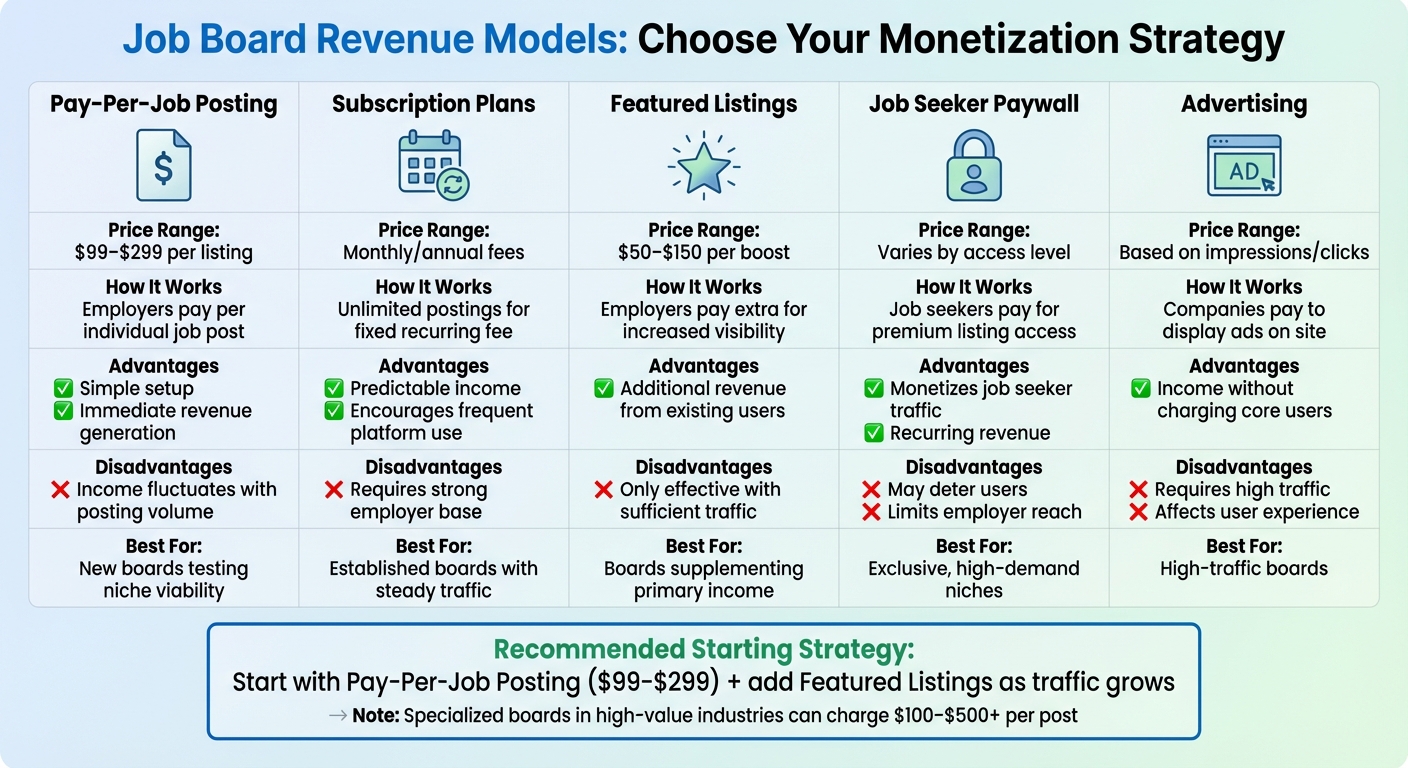
Job Board Revenue Models Comparison: Pricing, Advantages, and Best Use Cases
Laying the groundwork for your job board is crucial before diving into the technical and operational aspects. A well-thought-out plan ensures you're meeting the needs of both employers and job seekers while creating a platform that thrives.
Your job board serves two audiences: employers and job seekers. Success lies in understanding and balancing the needs of both. Employers look for a straightforward job posting process, tools to manage applications, and access to skilled candidates. On the other hand, job seekers value intuitive search filters, easy application processes, and personalized job alerts. The more users you attract on both sides, the more valuable your platform becomes - more job listings draw job seekers, and more job seekers attract employers.
Choosing the right niche and revenue model plays a huge role in your success. A targeted niche helps you stand out, while a revenue model ensures your platform is financially sustainable.
How to Choose Your Niche
The right niche is one where you can find a concentrated pool of qualified candidates, active employers looking to hire, and manageable competition. The goal is to pick a niche that's specific enough to stand out but big enough to support your business over time.
Start by analyzing industry trends and search data. Tools like Google Trends can help you see if people are actively searching for jobs in your chosen field. Industries like tech, design, healthcare, and creative roles are often good options because they have a steady demand for talent and candidates who are actively looking for opportunities.
Validate the demand before launching. Talk to employers in your target niche to understand their hiring challenges and whether they'd pay to use your platform. Speak with job seekers to uncover their frustrations with existing platforms. If you don’t see any competitors, it might signal a lack of demand. Conversely, if the market is crowded, figure out how you can differentiate your board.
Another factor to consider is the hiring frequency in your niche. Industries with constant hiring needs are better suited for subscription-based models, while seasonal industries may require a different approach. Geographic factors also matter - job boards targeting high-cost cities like New York or San Francisco can often charge higher fees compared to boards serving lower-cost regions.
Once your niche is validated, you can focus on selecting the right revenue model.
Revenue Models Explained
Here’s a breakdown of common revenue models to help you decide what works best for your job board:
| Revenue Model | How It Works | Advantages | Disadvantages | Best For |
|---|---|---|---|---|
| Pay-Per-Job Posting | Employers pay $99–$299 per job listing | Simple to set up; generates immediate revenue | Income fluctuates based on posting volume | New boards testing niche viability |
| Subscription Plans | Employers pay monthly/annual fees for unlimited postings | Predictable income; encourages frequent use | Requires a strong base of employers | Established boards with steady traffic |
| Featured Listings | Employers pay $50–$150 to boost job visibility | Extra revenue from existing users | Only works if your platform has sufficient traffic | Boards looking to supplement income |
| Job Seeker Paywall | Job seekers pay for access to premium listings | Monetizes job seeker traffic; creates recurring revenue | May deter job seekers; limits employer reach | Exclusive, high-demand niches |
| Advertising | Companies pay to display ads on your site | Generates income without charging core users | Needs significant traffic; can affect user experience | High-traffic boards |
If you’re just starting, the pay-per-job posting model is a great option. It’s simple to implement, doesn’t require a large user base, and ties revenue directly to platform activity. Pricing typically ranges from $99 to $299 per listing, but specialized boards in high-value industries can charge $100–$500+ per post.
To maximize revenue, consider offering tiered pricing options. For example, you could provide:
- A basic single-posting option for first-time users.
- Discounted packages (e.g., 5 postings for a lower rate per job).
- Premium listings with extended visibility or featured placement.
Experiment with pricing early on to find the balance between conversion rates and revenue.
Build Custom vs. Use a Ready-Made Platform
Before you pick a platform, decide whether you actually need one built from scratch. Custom development gives you full control over every feature, but it's a real engineering commitment - budgets starting in the tens of thousands of dollars, timelines measured in months, and ongoing maintenance once it's live. A ready-made, hosted platform trades some of that flexibility for speed: you can be online in days for a monthly subscription, with hosting, security, and updates handled for you.
When Custom Makes Sense
Custom builds pay off when your requirements go beyond what a general-purpose platform supports - deep integration with an existing member database, a highly specialized matching workflow, or listing volume in the tens of thousands. A few organization types tend to fit this pattern:
- Professional associations that need tight integration with an existing membership system and member-only perks
- Venture capital firms building internal hiring tools for portfolio companies
- Large staffing and recruitment agencies with complex candidate-matching logic
When Ready-Made Makes Sense
For most niche job boards, a ready-made platform is the better trade. You're testing a business idea, not building enterprise software, so speed to market and low fixed costs matter more than unlimited customization. It's the right call if:
- You're a solo founder or small team without a dedicated dev budget
- Your must-have features - postings, payments, filters, job alerts - are standard, not exotic
- You want to validate demand in a niche before committing serious capital
- You'd rather spend your time on marketing and employer outreach than server maintenance
This is the path most founders take, and the one the rest of this guide assumes. Job Boardly, for instance, runs $50/month on the Standard plan (or $100/month on Pro) with hosting and Stripe payments included; job backfilling from a database of 12M+ active listings is available too, though the listings you pull in are billed separately via backfill credits, sold as 1,000 for $12 ($0.012 each), 5,000 for $55 ($0.011 each), or 10,000 for $100 ($0.010 each) - still a fraction of the cost and lead time of a custom build.
The Quick Test
Lean custom if you answer "yes" to any of these: you need integrations no SaaS platform offers, you're managing tens of thousands of listings with unique matching logic, or you have a dedicated dev team and 2+ months to spare before launch. If none apply, a ready-made platform gets you to revenue faster - which is why the steps below start there.
Selecting Your Platform and Technical Setup
Once you've confirmed your niche and revenue model, the next step is choosing the right platform. Your choice here can significantly impact how quickly you launch, how much control you have over features, and how much time you’ll spend maintaining your site versus growing it.
You’ve got three main routes: no-code SaaS platforms, WordPress with job board plugins, or custom development - which, as covered above, runs $20,000–$50,000 or more over several months and is reserved for the edge cases already described. Assuming you're building a niche board rather than bespoke enterprise software, the real choice is between the first two. WordPress gives you more control over data and hosting, but you’ll need to manage things like security updates, plugin conflicts, and performance tuning - the same trade-offs that lead many builders to look for a WP Job Manager alternative. For solo founders or small teams launching their first job board, a job board SaaS platform is often the smartest move. These platforms handle hosting, security, and core features right out of the box, allowing you to focus on marketing and content instead of technical headaches.
Can You Create a Job Board Website for Free?
You can get a basic job board online for free. Embeddable job board widgets, free tiers of general no-code builders, free WordPress job board plugins, and even a Notion template can all hold a list of jobs without costing anything. For an internal careers page or a quick test of an idea, that may be all you need.
The limits show up as soon as you try to run a job board as a business:
- Branding and domain restrictions: free plans usually keep you on the provider’s subdomain with their branding, which makes it hard to look credible to employers.
- No way to charge employers: payment processing and paywalls are almost always paid features, so a free board can’t generate pay-per-post revenue.
- The empty-board problem: free tools don’t include job aggregation or backfilling, so you launch with zero listings and no automated way to fill them.
- SEO ceilings: you typically can’t edit meta tags, add job posting schema, or control URL structure - the exact things that drive long-term organic traffic.
A practical approach: use a free tool to validate that employers and job seekers in your niche actually want the board, then move to a dedicated platform once you’re ready to charge for postings. The realistic startup cost is modest - around $10–$20 per year for a domain plus about $50 per month for a hosted platform - far less than the $20,000+ price tag of custom development.
Required Platform Features
To run a successful job board, your platform needs to handle everything from posting jobs and processing payments to attracting organic traffic. Here’s what to look for:
- Quick setup: A no-code interface to configure pages, categories, pricing, and workflows without technical expertise.
- Secure payment processing: Integration with Stripe to process payments in USD, handle refunds, and maintain PCI compliance.
- Flexible pricing controls: Paywalls for premium listings, the ability to experiment with different prices (e.g., $99 vs. $149 per post), and tiered packages for added monetization options.
- Job aggregation or backfilling: Tools to import job listings from external sources - often via job aggregation - so your board isn’t empty at launch.
- SEO tools: Editable meta tags, clean URLs, schema markup for job postings, and automatic category or location pages to drive organic traffic.
- Mobile responsiveness: A design that works seamlessly on smartphones and tablets for job seekers on the go.
- User dashboards: Built-in tools for employers and candidates to manage listings, applications, and profiles, along with email alerts to keep users engaged.
If you’re looking for a platform that checks all these boxes, Job Boardly is worth considering. It’s a no-code solution that includes features like paywalls, job backfilling via Job Backfiller (drawing on 12M+ active listings) and the Job Aggregator (importing from sources you choose), built-in SEO tools with Google Jobs integration, Stripe payment processing, and customizable branding. Since it’s fully hosted, you don’t have to worry about server management or security. Pricing starts at $50/month or $400/year (about $33.33/month), and it supports unlimited jobs and traffic.
Once you’ve chosen your platform and outlined the features you need, it’s time to get your board up and running.
Technical Setup Checklist
Launching your job board involves a few essential technical steps. Here’s a quick guide to get you started:
-
Register your domain. Choose a descriptive, niche-specific .com domain through providers like Namecheap or GoDaddy. Expect to pay around $10–$20 per year (e.g.,
remotemarketingjobs.com). - Connect your domain. Update your DNS settings with the A or CNAME records provided by your platform. Most no-code platforms will automatically set up SSL certificates via Let’s Encrypt once the DNS changes propagate.
- Set your currency to USD. Configure your dashboard to display prices in U.S. format (e.g., $149.00) and create products like "Standard Job Post – $99 for 30 days" or "Featured Job – $149 with homepage placement."
- Integrate Stripe for payments. Open a U.S. Stripe account, complete the verification process, and link your bank for payouts. Use your platform’s integration tools to connect Stripe - usually just a simple "Connect with Stripe" button. Run a test transaction to ensure everything works, then switch to live mode.
- Customize your branding. Upload your logo, set your colors and fonts, and tweak your homepage to reflect your niche. Enable job backfilling if your platform supports it, so your board launches with listings already in place. Test the entire posting and application process on mobile devices to ensure a smooth user experience.
Step-by-Step: Building Your Job Board Website
Now it’s time to build the foundation of your job board. This step is all about structuring your site, organizing content, creating workflows for users, and setting pricing options. These elements shape how employers and job seekers interact with your platform.
Set Up Job Categories and Filters
Start by defining clear, focused job categories that align with your niche. For example, if your job board targets marketing roles, you might include categories like Content Marketing, SEO & SEM, Social Media, and Marketing Analytics. Keep it simple - too many options can overwhelm users.
Next, add filtering options that make it easy for users to find relevant jobs. Include filters for:
- Job type: Full-time, part-time, contract, freelance
- Location: Remote, specific cities, or states
- Experience level: Entry-level, mid-level, senior
- Salary range
If you’re using Job Boardly, you can customize categories through the dashboard. The platform also lets you create search pages that automatically generate landing pages, such as remote content marketing jobs or senior SEO jobs in California. These pages not only enhance user experience but also boost your SEO by targeting long-tail keywords.
Once your categories and filters are set, focus on designing workflows for both employers and job seekers.
Create Workflows for Employers and Job Seekers
For employers, the process should be straightforward. They should be able to:
- Register on your site
- Post job listings with key details like title, description, requirements, salary range, and posting duration
- Manage their listings via a dashboard where they can track applications and see performance metrics
To reduce friction, keep the required fields minimal - stick to basics like job title, description, and contact details.
For job seekers, prioritize features that make the process seamless. Allow them to:
- Create profiles and upload resumes
- Set up job alerts tailored to their preferences (e.g., category, location, keywords)
- Save jobs they’re interested in
Simplify the application process by asking only for essential details like contact information and a resume. Make additional fields optional to avoid discouraging users.
Don’t forget to test all workflows on mobile devices. Ensure buttons are easy to tap, forms are quick to fill out, and the overall experience is smooth on smaller screens.
Set Pay-Per-Job Posting Pricing
To monetize your job board, create tiered pricing packages that cater to different employer needs. For example:
- Basic listing: $29–$49 for 30 days with standard placement
- Featured listing: $49–$79 for 60 days with increased visibility
- Premium package: $99–$149 for 90 days, offering top placement and social media promotion
You can also offer add-ons, such as:
- Job bumping: $15–$25 to move a listing back to the top
- Highlighted listings: $10–$20 for extra attention
If you’re using Job Boardly, you can set up pricing tiers directly in the platform’s settings and connect your Stripe account for seamless payment processing. Don’t forget to create promotional offers, like a "LAUNCH50" coupon for 50% off the first 10 job postings, to attract early users. Finally, test the payment process to ensure transactions go through smoothly and confirmation emails are sent correctly.
Getting Jobs, Attracting Traffic, and Making Money
Once your job board is live, the real challenge begins: filling it with quality job listings, attracting the right audience, and turning it into a revenue-generating platform. These three elements - listings, traffic, and monetization - are the building blocks of your job board's success. Your focus during the first 30–60 days should be on all three.
How to Get Your First Job Listings
Start by manually curating 20–50 jobs that align with your niche. For instance, if your focus is remote marketing roles in U.S.-based SaaS companies, find relevant positions and add them to your board. Be sure to include clear attribution and links to the original source. This step avoids an empty board while establishing credibility early on.
Next, launch a targeted outreach campaign. Identify 50–200 active employers in your niche and send personalized cold emails or LinkedIn messages. Offer them a free or heavily discounted first posting - for example, 50% off your standard $149 rate - in exchange for feedback and testimonials. Highlight the value of your niche audience and make the offer time-sensitive (e.g., 30 days). To make it easier for busy hiring managers, offer to create and optimize the job listing for them.
You can also use job aggregation tools to supplement your listings. Configure filters to pull in jobs that match your niche, such as "remote product manager jobs in the U.S." While these aggregated listings help keep your board fresh, prioritize direct employer postings by featuring them prominently at the top of category pages. Clearly label aggregated jobs (e.g., "Sourced from partner job sites") to maintain transparency and build trust.
Once you’ve established a solid base of listings, shift your focus to driving traffic.
Driving Traffic to Your Job Board
Search engine optimization (SEO) is your most reliable long-term traffic source. To maximize organic traffic, ensure your site has fast load times, is mobile-friendly, and uses clean URL structures (e.g., /remote-software-engineer-jobs/us). Add schema markup for job postings and use the Google Indexing API to speed up the indexing process for new listings.
Create pages tailored to specific combinations of location, role, and job type (e.g., "remote senior designer jobs in New York" or "entry-level data analyst jobs in San Francisco"). These long-tail pages can attract job seekers with highly specific search queries. Over time, SEO can become your primary traffic driver, with case studies showing that some job boards earn 50–70% of their traffic from Google within 6–12 months of consistent effort.
In addition to SEO, publish 1–2 short, focused content pieces each week. Examples include salary guides for specific roles, articles like "Top Companies Hiring [Role] in 2026", or interview tips for your niche. Share these posts on platforms like LinkedIn, X, Facebook groups, and Reddit communities. Build an email list early by offering opt-in forms on your site and a weekly roundup of "who’s hiring in [niche]." Even a small list of 200–500 subscribers can drive consistent traffic.
Form partnerships with bootcamps, universities, professional associations, and niche communities like Slack or Discord groups. Offer free or discounted postings to their employers in exchange for promoting your job board. These partnerships can introduce your board to highly engaged audiences.
To jumpstart traffic, consider running small ad campaigns. Spend $5–$20 per day on Meta or LinkedIn ads targeting your niche roles and locations. Drive traffic to curated job collections or lead magnets to maximize the return on investment.
Once you’ve built a steady flow of traffic and engagement, it’s time to monetize.
Making Money with Pay-Per-Job Posting
To monetize effectively, set competitive pricing for job postings. Start with an introductory range of $49–$99 for basic listings, then gradually increase rates as your board demonstrates value through clicks, applications, and hires. Many niche job boards eventually charge $100–$300 for a 30-day post, with premium options for enhanced visibility.
Offer three straightforward pricing tiers to maximize both value and revenue:
| Tier | Price (USD) | Duration | What's Included |
|---|---|---|---|
| Basic | $79–$129 | 30 days | Standard listing in search results with a basic company logo |
| Standard | $149–$249 | 30 days | Includes everything in Basic, plus featured placement, newsletter inclusion, and a company profile page |
| Premium | $249–$399 | 60 days | Includes everything in Standard, plus homepage placement, social media promotion, and extended visibility |
Offer bulk packages to encourage repeat business. For example, sell 5 job postings for $600 or 10 for $1,000. Monthly subscriptions for agencies and frequent employers are another great option. If you’re using Job Boardly, enable the "Charge for job posts" feature and integrate with Stripe for seamless payment processing in USD.
Use your platform’s analytics to track which categories, locations, and sources generate the most applications. Share key metrics with employers - such as average clicks per job, application rates, and time-to-fill data. This data demonstrates your board’s effectiveness, helping to justify higher pricing and turning trial users into repeat customers. Research shows that 20–30% of employers return for additional postings, often driving 60–80% of revenue. Prioritize retention by delivering excellent results and responsive support.
Your 30-Day Launch Plan
You don't need months to get a job board live. The smartest approach is to launch lean, then refine based on real feedback. As proof of what a focused niche board can earn, RemoteOK reportedly generates around $95,000/month by selling roughly 159 job posts at $600 each - a reminder that a specialized audience can command premium posting fees. Here's a realistic 30-day roadmap to go from idea to a live, revenue-ready board:
| Week | Focus Area | Key Actions |
|---|---|---|
| Week 1 | Foundation | Research and validate your niche, set up your platform account, register and link your domain, and customize branding. |
| Week 2 | Content | Organize 5–7 job categories, enable job backfilling and aggregation so the board isn't empty, and manually curate 20–50 quality listings. |
| Week 3 | Monetization | Connect Stripe, set up paywall and pricing tiers, and create launch discount codes for early employers. |
| Week 4 | Launch & Promote | Optimize for SEO and Google Jobs, test the full posting and payment flow, then begin employer outreach and promotion. |
Keep expectations realistic: SEO typically takes 2–3 months to gain traction, so the goal of your first 30 days is momentum - a live board, real listings, working payments, and your first promotional push - not instant profitability. Early traffic, employer interest, and search indexing all compound over time.
Maintenance, Optimization, and Mistakes to Avoid
Keeping Your Job Board Updated
Keeping your job board fresh and relevant is key to maintaining credibility and staying competitive. One major issue to watch out for is expired job listings. Jobs that linger past 60–90 days can make your site look inactive, which turns off both job seekers and employers. To avoid this, set job listings to automatically expire after 60–90 days. If you're using tools like Job Boardly, you can configure expiration periods and even send renewal reminders to employers, creating opportunities for repeat business.
Make it a habit to review your analytics weekly. Pay close attention to which job categories perform best, where your traffic is coming from (like organic search or social media), and which listings are generating applications. This data can help you make important tweaks - like refining filters, updating job categories, or adjusting pricing. For example, if "remote software engineer jobs" consistently attract high traffic, you might want to add more specific filters to capture niche searches.
Don't forget about mobile users. Over half of U.S. job seekers search on their phones, so test your site's mobile performance every quarter. Slow load times (anything over 3 seconds) and clunky forms can drive users away. Optimize by compressing images, enabling caching, and simplifying application processes with features like one-click apply or resume uploads.
Moderation is another must. New job postings should be reviewed regularly to prevent spam, scams, or low-quality listings. Even one fake job can damage your reputation. Use tools like reCAPTCHA, require email verification for employers, and manually review initial posts for legitimacy. Also, keep your job categories updated to reflect new trends, such as adding roles like "AI engineer" or "climate tech specialist" as demand shifts.
By staying on top of these updates and regularly testing performance, you’ll ensure your job board remains reliable and user-friendly.
Common Mistakes and How to Avoid Them
Even with a solid maintenance routine, certain missteps can hold back your job board's success. Here are some common pitfalls and how to sidestep them:
| Mistake | Impact | How to Avoid |
|---|---|---|
| Too broad a niche | Weak SEO, low employer ROI, and lack of differentiation | Start with a specific focus, like "remote healthcare admin jobs in Texas", and expand only after gaining traction. |
| Setting prices too low | Attracts low-quality employers and limits revenue potential | Research market rates, test tiered pricing (e.g., basic, featured, premium), and start with rates in the $79–$149 range for standard posts. |
| Ignoring mobile and page speed | High bounce rates and frustrated users | Use responsive design, optimize images, enable caching, and aim for load times under 3 seconds. |
| Not removing expired jobs | Makes the site look outdated and hurts SEO | Automatically expire listings after 60–90 days and actively moderate for outdated or spam posts. |
| Ineffective search and filtering | Makes it hard for users to find relevant jobs | Offer clear filters like location, remote status, salary in USD, and experience level, and refine them based on feedback. |
| Overcomplicating the MVP | Delays launch and adds unnecessary costs | Start simple with core features (posting, searching, applying, payments) and add extras only after validating demand. |
| Neglecting SEO and schema markup | Misses out on organic traffic and visibility in Google Jobs | Optimize pages for long-tail keywords, use descriptive URLs, and implement job posting schema markup. |
To keep your board populated while building relationships with employers, consider job aggregation tools to backfill listings. For instance, Job Boardly's Job Aggregator and Job Backfiller can automatically pull in relevant jobs from APIs, with credits sold in bundles (1,000 credits for $12 ($0.012 each), 5,000 for $55 ($0.011 each), or 10,000 for $100 ($0.010 each)) and valid for 12 months from purchase. Clearly label these as "sourced from partner sites", but prioritize direct employer postings as your platform grows.
Finally, resist the urge to overbuild early on. Advanced features like AI-powered matching or in-platform messaging might sound appealing, but they can drain resources before you’ve validated demand. Focus on the essentials - helping employers post and pay, and enabling job seekers to search and apply. Platforms like Job Boardly handle hosting, security updates, SEO tools, and payment integration, so you can concentrate on growing your business instead of managing technical details.
Keeping Job Seekers Engaged and Scaling to New Markets
Getting job seekers to visit once is only half the job - the boards that last turn that first visit into a habit. Two things make the biggest difference once you're past launch: keeping job seekers coming back, and knowing when and where to expand.
Turn Job Alerts Into a Retention Tool
Job alerts are one of the simplest ways to bring job seekers back without any extra work on your part. Add signup prompts in more than one place - on search results pages, on individual job listings, and in a pop-up for first-time visitors - rather than relying on a single form. Let users filter alerts by job title, location, salary range, remote status, or category, but keep the signup itself short: an email address is all you need to start sending alerts. Leave the resume upload out of the alert signup - collect it later and keep it optional, for example when someone creates a candidate profile. Every extra field you ask for cuts into signups.
Pair alerts with a small library of career resources - salary guides, interview tips, or resume advice for your niche. This gives job seekers a reason to return even when they're not actively applying, and reinforces your board as a destination rather than a one-time search result.
Use Search Data to Decide Where to Expand
Once your board has traction in its core niche, resist expanding on instinct. Look at which categories and locations already send you the most traffic and applications, then use search-volume data (Google Trends or a keyword tool) to compare that against nearby categories or metro areas you haven't targeted yet. A landing page for a related role or a nearby high-demand city is a lower-risk way to test a new segment than rebuilding your niche from scratch.
Track the same core metrics regardless of stage: top-performing categories, which alerts get the most signups, and which employers generate the most applications. If one segment consistently outperforms the rest, that's usually your clearest signal for where to invest in dedicated content or landing pages next.
Conclusion
Creating a job board website involves a few key steps: identifying your niche, deciding on a revenue model (like pay-per-job posting or subscriptions), selecting a reliable platform, and filling your board with high-quality listings. A well-defined niche not only draws in the right employers and job seekers but also boosts relevance and improves SEO performance. Instead of trying to cater to everyone, the most successful job boards focus on becoming a go-to resource for a specific community, setting the foundation for steady growth.
Using a no-code platform like Job Boardly can make the process faster and easier. It comes with built-in monetization tools, including paywalls and Stripe integration — you set your own posting rates, typically in the $99–$299 range discussed earlier in this guide. Other features like automatic job backfilling, SEO optimization tools, and mobile-responsive design ensure your board stays competitive - all without requiring technical expertise. With a $50 monthly subscription and backfill credits sold as 1,000 for $12 ($0.012 each), 5,000 for $55 ($0.011 each), or 10,000 for $100 ($0.010 each), valid for 12 months from purchase, you can launch a lean operation and scale up as your business grows.
Running a job board isn’t a one-and-done task - it requires continuous effort. From removing outdated job posts to fine-tuning filters and adjusting pricing, staying competitive means ongoing maintenance. But by starting with a clear niche, focusing on essential features, and building strong relationships with a few quality employers, you can create a thriving platform that grows steadily over time.
If you've got a niche in mind, there’s no better time to get started. Launch your job board today to connect with your community and begin generating revenue.
FAQs
How do I choose the right niche for my job board?
When choosing a niche for your job board, aim for fields with a solid demand or industries where you already have expertise. Look into niche areas such as tech, healthcare, remote work, or local services - these often have untapped potential and can help you attract a focused audience while differentiating yourself from competitors. Dive into market trends and pinpoint gaps to uncover opportunities for growth and to better connect with your target users.
What are the best ways to drive traffic to my job board website?
To attract more visitors to your job board, start by focusing on SEO (Search Engine Optimization) to boost your site's visibility on search engines. Incorporate relevant keywords, craft compelling meta descriptions, and ensure your URLs are clean and easy to navigate. Pair this with active promotion on social media platforms, targeting niche-specific groups and communities where your audience is most active.
Another powerful tool is email marketing. Build a subscriber list and regularly share updates about new job postings or industry tips to keep your audience engaged and informed.
Expand your job listings by using job aggregation and backfilling features, which can help attract a broader audience by offering a diverse range of opportunities. A professional and trustworthy image is key, so customize your domain and branding to make a strong impression. Offering free trials or limited access is another great way to encourage users to explore your platform and potentially become loyal visitors.
Lastly, create and share valuable content, such as blogs, guides, or industry resources. This not only positions your job board as an expert in your niche but also keeps your audience engaged and coming back for more.
What are the most effective ways to make money with a job board website?
There are plenty of ways to make money with a job board website. One common method is to charge employers for posting jobs, either through pay-per-post or pay-per-application pricing models. Another approach is offering subscription plans to employers or job seekers, giving them access to premium features or exclusive job listings.
You can also bring in revenue through job backfilling or aggregation services, which let you display extra job listings while earning commissions. On top of that, offering custom branding options or enhanced visibility for job posts can appeal to businesses willing to pay for more exposure. The key is to ensure you're delivering real value to both job seekers and employers, which will help you unlock your site's full earning potential.
Can I create a job board website for free?
Yes - free job board widgets, free tiers of no-code builders, and free WordPress plugins can get a simple board online at no cost. The catch is that free options generally leave you on a branded subdomain, can’t process payments, don’t include job aggregation, and offer little SEO control. They work well for validating a niche, but once you want to charge employers for postings you’ll need a paid platform - typically around $50 per month plus $10–$20 per year for a domain.
How much does it cost to start a job board?
You can start lean. A hosted no-code platform like Job Boardly runs about $50/month (or $400/year), plus roughly $10–$20 per year for a domain - far less than the $20,000+ cost of custom development. Beyond the platform, optional costs include branding, email tools, and any paid marketing, but many founders launch with almost no ad budget and rely on SEO and community outreach, scaling spend only as revenue grows.
Are niche job boards more successful than general job boards?
For independent founders, usually yes. General boards compete on volume and brand recognition against giants like Indeed and LinkedIn, which is hard to replicate. A niche job board wins on relevance instead - it attracts higher-quality candidates and more motivated employers, makes SEO easier, and often lets you charge more per listing because employers are paying for targeted exposure rather than raw traffic.
Before you go: launch your
job board in 10 steps
Get the free interactive checklist + insider tips on building a profitable job board sent to your inbox.